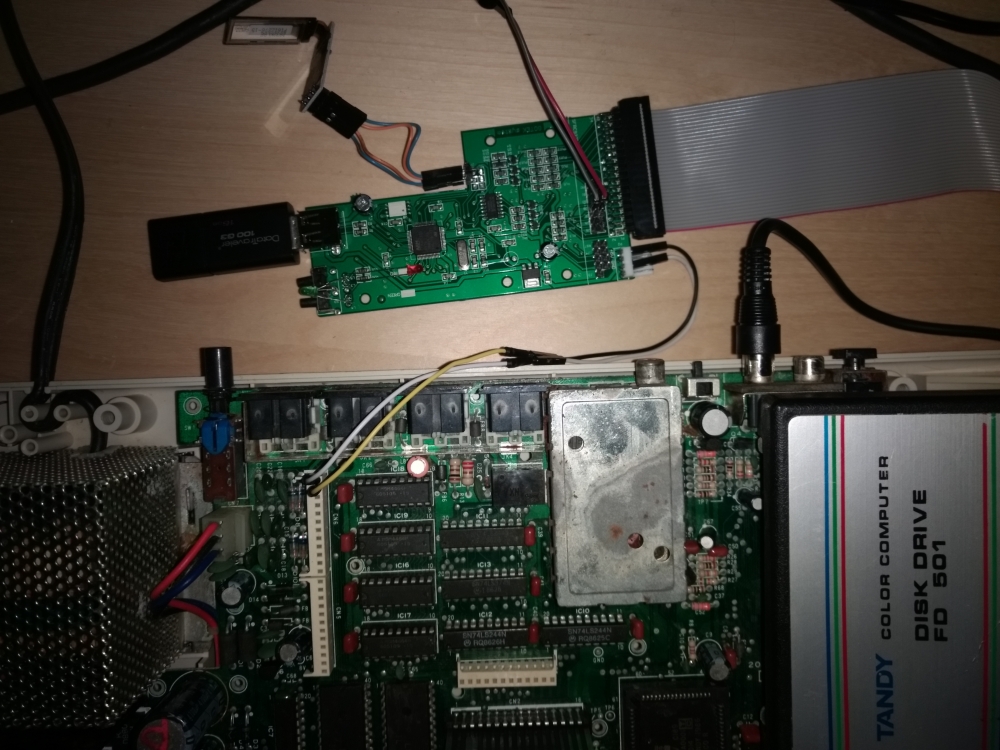
There is not much documentation about using a Gotek drive on a color computer and setting flash floppy firmware using a Mac.
Part 1: Hardware setup
Order the Gotek drive from here. Make sure the drive selection jumper in on pins S0 and not S1.
Connect the FD501 drive controller cartridge to the Gotek using a cable from here. Careful to connect the red site of the ribbon to the pin 1 side of the connector on the Gotek.
Connect the OLED LCD display from here to the Gotek:
- GND: J7 external (closer to the external edge of the Gotek board) upper pin
- VCC: J7 external lower pin
- SLC: J7 internal lower pin
- SDA: J7 internal upper pin
Connect the piezo buzzer from here to the Gotek:
- Longer pin: External (next to the floppy connector) JB pin
- Shorter pin: Internal JB pin
Connect the power connector of the Gotek to the color computer:
- 5V: pin 2 of the CN6 connector. Can also be connected to pin 9 of the cartridge port
- GND: pin 1 (closer to the back of the motherboard) of the CN6 connector. Can also be connected to pin 33 of the cartridge port
It looks like this: